
Google Shopping Feed Optimisation Strategies for Revenue & ROI

With the continued advancements in Google Shopping algorithms, the evolution of ecommerce and AI, 2026 brings new challenges and opportunities for advertisers. Whether you're a retailer or a digital marketer, Google Shopping feed optimisation is more critical than ever. In this post, we’ll break down the latest Google Shopping best practices to grow ecommerce revenue, ROAS (Return On Ad Spend) and ROI (Return On Investment), prioritising what matters most to Google and your potential customers.

Why Google Shopping Still Matters
Google Shopping remains one of the highest-performing platforms for ecommerce businesses. According to Promodo, with average CPCs as low as £0.53, compared to £1.95 for Search Ads and a growing suite of automation tools, Google Shopping has become a go-to platform for driving product visibility and sales.
Your product title is your first introduction to shoppers on Google Shopping, your opportunity to capture attention and make a strong first impression.
But with more automation comes more competition and success starts with the basics. Before diving into bidding strategies or campaign tweaks, it's crucial to get your foundation right by optimising the six most important product attributes. These elements have the biggest impact on visibility, eligibility, and click-through rates in Google Shopping.
The 6 Most Important Attributes for Shopping Feed Optimisation
Google Shopping ads are driven by structured product data. These six attributes play the biggest role in your product's visibility and performance, in order of priority:
- Price – Competitive pricing is essential. Google compares your product to similar listings.
- Title – Packed with keywords and structured clearly.
- GTIN – Global Trade Item Numbers (GTINs) help Google match your product to its catalogue, increasing eligibility.
- Image – The visual hook. Poor-quality images = missed clicks.
- Description – Keywords here still matter. Keep it relevant and helpful.
- Category – Google's automatic assignment isn’t always accurate, manually categorise where possible.
Optimise Product Titles for Relevance and Visibility
Your product title is your first introduction to shoppers on Google Shopping, your opportunity to capture attention and make a strong first impression. Instead of rushing through it, take the time to craft a title that’s clear, compelling, and rich with the keywords your customers are actually searching for.
Best Practices:
- Front-load keywords – Put the most relevant search terms first (Google prioritises the first 70 characters).
- Consider search behaviour – Is your brand well-known? If not, move it towards the end.
- Structure – For example, in apparel:
Nike Air Max 270 Trainers – Black – Size 9 - Avoid fluff – Phrases like “best deal” or “high quality” don’t add value to Google’s algorithm.
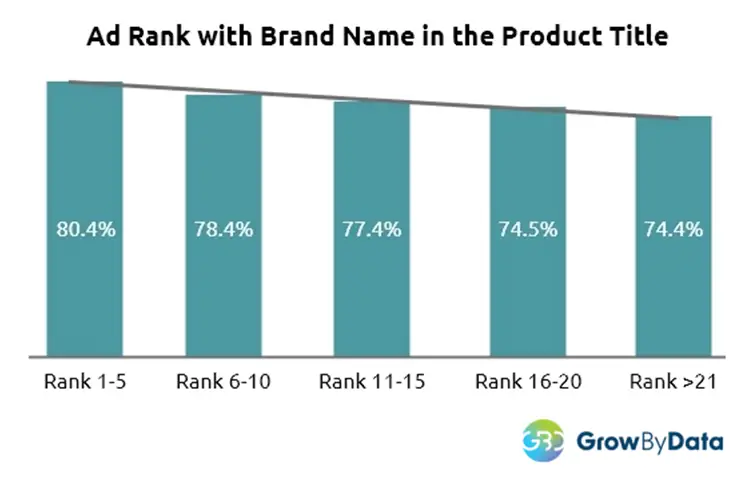
A study by GrowByData found that 77% of product titles on Google Shopping included the brand name. Among top-performing ads, those ranked in positions 1 through 5, 80% featured the brand name in the title. This highlights the brand name's importance as a key product identifier used by Google to interpret and rank listings. When your brand has recognition or aligns with how users search, including it in the title can significantly improve visibility and performance.
Use High-Quality, Compliant Images in Shopping Feed Ads
Your product image is usually the very first thing shoppers notice and it’s what makes them either stop and click or keep scrolling past. It’s your chance to show off your product in the best light, with clear, high-quality photos that catch the eye and spark interest.
Google Shopping Feed Image Requirements:
- Size: At least 800 × 800px.
- Background: Clean, white or light grey preferred.
- No overlays: Avoid watermarks, logos, or promotional text.
- Clarity: Use high-resolution, well-lit, in-focus images.
Pro Tips:
- Test lifestyle images for top performers to increase click through rate (CTR).
- Use supplemental feeds to trial image variations without affecting the main feed.

Products with high-resolution images experience a 94% higher conversion rate compared to those with low-quality photos. Clear and detailed visuals help shoppers better evaluate products, build trust, and make confident purchasing decisions. GrabOn’s top photography statistics in 2025 highlight this significant impact, making high-quality images a key strategy for boosting engagement and driving more sales.
Include Global Trade Item Numbers (GTINs)
GTINs are a great way to boost your product’s visibility. Google uses these unique codes to match your items with its massive catalogue, helping your listings show up in more relevant searches and getting you into better auctions where the competition really counts.
Where to Find GTINs:
- On the product barcode
- From your supplier or manufacturer
- Use the GS1 lookup tool
If you don’t include a GTIN when one exists, your ads may be disapproved or simply never show.
Keep Price and Availability in Sync
Google Shopping requires your product pricing and stock availability to be accurate at all times. Discrepancies can lead to account suspensions or disapproved items, and nobody wants that.
Maintain Feed Health By:
- Syncing your product feed with your website regularly
- Increasing update frequency during promotions or flash sales
- Using automated feed updates or supplemental feeds for quick changes
Segment With Custom Labels
Custom labels might not boost performance on their own, but they unlock game-changing campaign setups and bidding strategies that can take your ads to the next level!
Use Custom Labels For:
- Bestsellers
- Seasonality (e.g. “Winter”)
- Price tiers (e.g. “£0–50”, “£50–100”)
- Margins (e.g. “High Margin”)
- A screenshot of a website
- AI-generated content may be incorrect. Product lifecycle (“New”, “Clearance”)
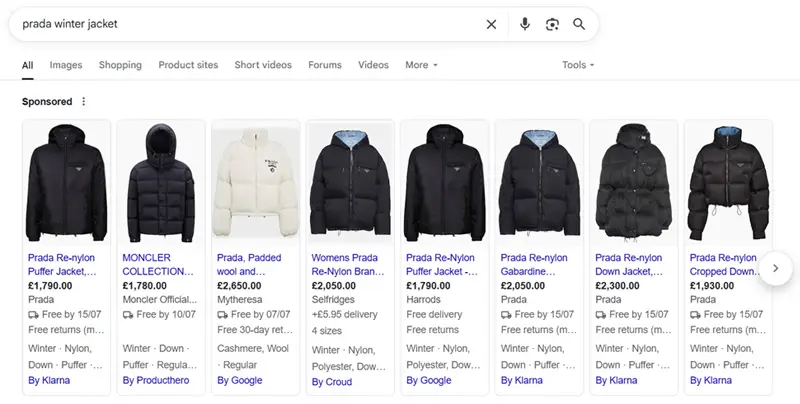
As shown in the example above, these Prada winter jackets are clearly seasonal. When setting them up in Google, it helps to use custom labels to group them by season. This makes it easier to build separate campaigns and asset groups, quickly decide which products to show together, and keep track of how they’re performing.
Segmenting by season also gives you more flexibility with budgeting and bidding. For example, you can increase spend during peak winter months when demand is higher, and scale back once the season ends. It also allows for more tailored ad copy and creatives that match the seasonal context, helping improve click-through rates and overall campaign relevance.
Use Supplemental Feeds to Your Advantage
Supplemental feeds let you supercharge your main feed with quick updates and extra details, no full re-upload needed. They’re perfect for:
- Adding temporary sale prices or promotions
- Adding missing data (e.g. GTINs, custom labels)
- Quickly swapping out images to keep your listings fresh
Implement Negative Keywords for Smarter Targeting
Google Shopping campaigns might not rely on keywords like Search does, but don’t underestimate the power of negative keywords, they’re still your secret weapon for keeping your ads sharp and focused!
Benefits:
- Reduce wasted spend on irrelevant searches
- Focus budget on high-intent terms
- Improve campaign efficiency and ROI
Regularly reviewing your Search Terms Report can lead to noticeable improvements in ROAS. Our ecommerce PPC agency management service includes ongoing keyword refinement as standard.
Regularly Audit and Update Your Feed

Shopping campaigns aren’t something you can just set up and forget. Top advertisers are always on the lookout, tweaking and updating their feeds to stay ahead of the game. To keep your feed in top shape:
- Check diagnostics in Google Merchant Center
- Fix errors or warnings promptly
- Refresh outdated descriptions or imagery
- Track underperforming products and test different variations to boost results
Final Thoughts: What Success Looks Like in 2025
Mastering Google Shopping in 2025 is about quality over quantity. Instead of flooding your feed with products, focus on data precision, campaign structure, and feed health.
With rising automation and AI-driven auction dynamics, success lies in feeding Google the cleanest, most complete data and giving your products the best chance to shine.
Want help transforming your Google Shopping strategy? Our team at ThoughtShift are specialists in collaborating with retail, D2C and B2B brands to optimise shopping feeds, grow ROAS, and increase ecommerce revenue. Contact us today for a free consultation and find out how our PPC experts can help.